


Custom toolbar can be added to WebTextEditor using various approaches:
- Using InitializeToolBar server-side event
In certain scenarios, several commands might need to be added or removed while maintaining the remaining commands that have already been included in the toolbar. InitializeToolBar server-side event can be used for this purpose. This topic will be further explained in next topic.
- Using XML File
In Design-time
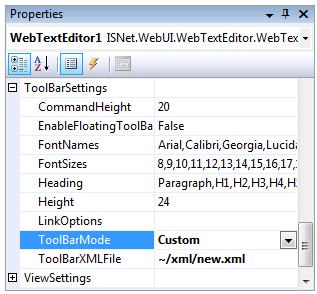
To add custom toolbar, simply set ToolBarSettings >> ToolBarMode property to Custom, and set the path of custom XML file definition in ToolBarSettings >> ToolBarXMLFile property.
Programmatically
To add custom toolbar programmatically, use LoadToolBarsStructureFromXml method to load the xml file definition.
protected void Page_Load(object sender, EventArgs e)
{
WebTextEditor1.LoadToolBarsStructureFromXml(Server.MapPath("~/xml/new.xml"));
}
In This Section
How-to: Add Custom ToolBar using XML File
How-to: Save and Load ToolBar Structure